TalkTech 2026:
Exploring the use of AI in Business and Industry
with Virtual Reality
|
|
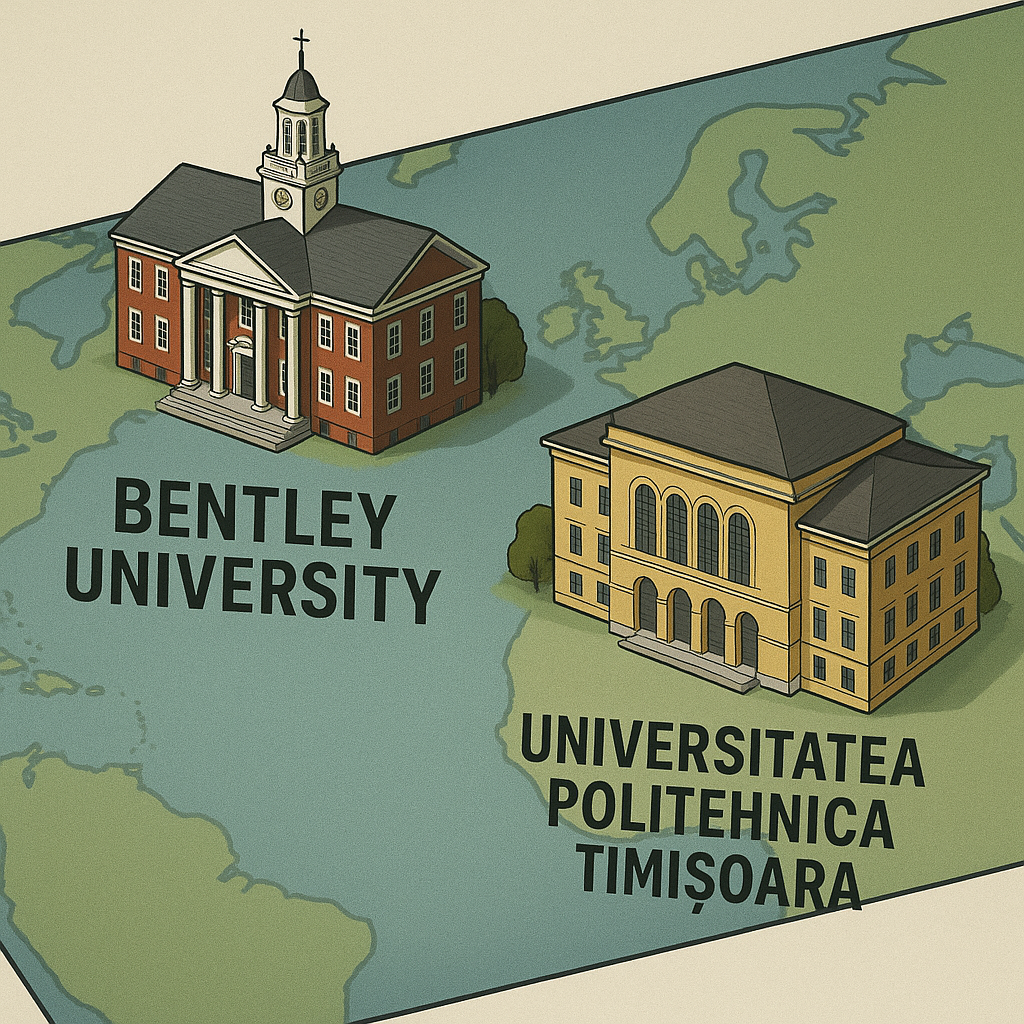
A Global Collaboration Project between Politehnica University of Timișoara, Romania and |
1. AI in Healthcare & Surgical Training 2
2. AI in Crisis Management & Emergency Response 2
3. AI in Cybersecurity & Network Defense 2
4. AI in Hospitality & Hotel Management 3
5. AI in Auto Design & Autonomous Vehicles 3
6. AI in Online Commerce & Spatial Retail 3
7. AI in Human Resources & Talent Management 3
8. AI in Sustainable Energy & Smart Power Grids 4
9. AI in Aviation & Flight Operations 4
10. AI in Education & Digital Museums 4
11. AI in Financial Intelligence & Spatial Analytics 4
12. AI in Real Estate & Home Design 4
Collaboration with UniCampus 6
1 Initial Progress and Planning (one per school, about 100 words) 7
2 Mid-Project Progress (one per school, about 100 words) 7
3 Reflection Blog Post (one per person, about 200 words) - 8
Virtual Reality Scene Requirements 8
Description
In this global collaboration project, you will research the use of artificial intelligence (AI) in a chosen industry and create VR scenes showing the state of AI today and what you envision could be possible in 2035.
Bentley students in CS100 (Solving Business Problems with Information Technology) , and UPT students in TMM (Technology of Multimedia) will participate in teams of six (3 students from BU and 3 students from UPT per team) to explore the role of artificial intelligence in one of these industries, with a focus on examples from their home countries:
You will use web-based collaboration and communication tools to meet both synchronously (in real time using voice, video, and chat) and asynchronously (via email, or messaging) to collaborate on scenes that illustrate these concepts.
Topics
Sign up for a topic to create a VR scene in Delightex that can be used as the backdrop to a dialogue between avatars about the role of artificial intelligence in the industry you selected. Google Gemini suggested these ideas as possible starting points for your topics. Feel free to consider them or use your own:
1. AI in Healthcare & Surgical Training
-
Present-Day Scenario (2026): Example and possible idea: A hospital operating room where medical staff monitor patient vitals on standard screens and manually review scans to plan surgical procedures.
-
Future AI Application (2035): Example and possible idea: Real-time computer-vision surgical assistants that project 3D holographic anatomical overlays directly onto the patient, combined with predictive AI models that forecast vital sign drops before they happen.
2. AI in Crisis Management & Emergency Response
-
Present-Day Scenario (2026): Example and possible idea: An emergency dispatch command room utilizing flat screens and radio feeds to track floodwaters or disaster responses manually.
-
Future AI Application (2035): Example and possible idea: Generative AI dynamic hazard models that map evacuation routes in real time while coordinating autonomous drone swarms for search-and-rescue.
3. AI in Cybersecurity & Network Defense
-
Present-Day Scenario (2026): Example and possible idea: An IT server room where analysts manually check firewall logs and respond to security alerts after a breach attempt.
-
Future AI Application (2035): Example and possible idea: Agentic AI threat hunters that instantly isolate compromised network nodes, block attacker origins, and patch zero-day vulnerabilities in a 3D digital command center.
4. AI in Hospitality & Hotel Management
-
Present-Day Scenario (2026): Example and possible idea: A hotel front desk lobby where human agents check in guests using physical key cards and printed guides.
-
Future AI Application (2035): Example and possible idea: Multilingual AI guest-service avatars that analyze guest sentiment and customize room amenities, lighting, and itineraries automatically.
5. AI in Auto Design & Autonomous Vehicles
-
Present-Day Scenario (2026): Example and possible idea: A university engineering lab where technicians inspect vehicle parts and run standard wind-tunnel tests.
-
Future AI Application (2035): Example and possible idea: In-cabin computer vision systems that track driver drowsiness in real time, paired with generative AI designing aerodynamic vehicle shapes and executing edge-computing self-driving decisions.
6. AI in Online Commerce & Spatial Retail
-
Present-Day Scenario (2026): Example and possible idea: A brick-and-mortar clothing boutique with physical racks, static mannequins, and traditional cash registers.
-
Future AI Application (2035): Example and possible idea: Spatial shopping showrooms featuring 3D customer avatars, virtual try-ons, and predictive recommendation algorithms that auto-size apparel instantly.
7. AI in Human Resources & Talent Management
-
Present-Day Scenario (2026): Example and possible idea: A corporate conference room set up for a structured face-to-face job interview with paper evaluation sheets.
-
Future AI Application (2035): Example and possible idea: Generative AI interview avatars that conduct realistic practice simulations, analyze non-verbal communication, and deliver real-time soft-skills coaching.
8. AI in Sustainable Energy & Smart Power Grids
-
Present-Day Scenario (2026): Example and possible idea: An onshore or offshore wind farm field where technicians conduct manual periodic clipboard inspections.
-
Future AI Application (2035): Example and possible idea: IoT sensors paired with machine learning algorithms that detect micro-wear on turbine blades weeks before failure, automatically scheduling maintenance during low-demand hours.
9. AI in Aviation & Flight Operations
-
Present-Day Scenario (2026): Example and possible idea: An airplane cockpit where pilots flip physical manual switches and consult printed flight checklists.
-
Future AI Application (2035): Example and possible idea: Glass cockpits featuring intelligent co-pilot systems that dynamically recalculate fuel-efficient routes to bypass severe storms and avoid airspace congestion.
10. AI in Education & Digital Museums
-
Present-Day Scenario (2026): Example and possible idea: A museum gallery with glass display cases and static descriptive text plaques.
-
Future AI Application (2035): Example and possible idea: Reconstructed historical environments featuring fine-tuned LLM historical avatars that answer student questions in character based on primary source documents.
11. AI in Financial Intelligence & Spatial Analytics
-
Present-Day Scenario (2026): Example and possible idea: A financial advisor's office with dual computer monitors displaying standard spreadsheet stock charts.
-
Future AI Application (2035): Example and possible idea: Multi-dimensional 3D spatial data vaults where deep learning models detect global money-laundering anomalies and summarize market risk exposure in real time.
12. AI in Real Estate & Home Design
-
Present-Day Scenario (2026): Example and possible idea: An unfurnished, empty residential apartment room being measured with tape measures and blueprints.
-
Future AI Application (2035): Example and possible idea: Architectural studios utilizing generative AI to instantly stage empty rooms with custom furniture styles and predict accurate property valuations using neighborhood micro-trends.
Project requirements:
Working with your international partners, you will create three scenes (one by the team from Bentley, one by the team from UPT, and one collaboratively with your international partners, designed together):
-
Scene 1 (Bentley Team - Present Day): One scene describing the current state of AI in your chosen industry today (2026), from an American perspective, using an AI-generated 360-degree image background.
-
Scene 2 (UPT Team - Present Day): One scene describing the current state of AI in your chosen industry today (2026) from the European/Romanian perspective, using an AI-generated 360-degree image background.
-
Scene 3 (Collaborative Team Scene - Futuristic 2035): One futuristic 3D scene built collaboratively by both university’s partners showing how AI will transform the industry in the year 2035.
Ask AI to generate a realistic 360-degree image as the background for your scene. Here’s an example of an operating room scene generated by AI:
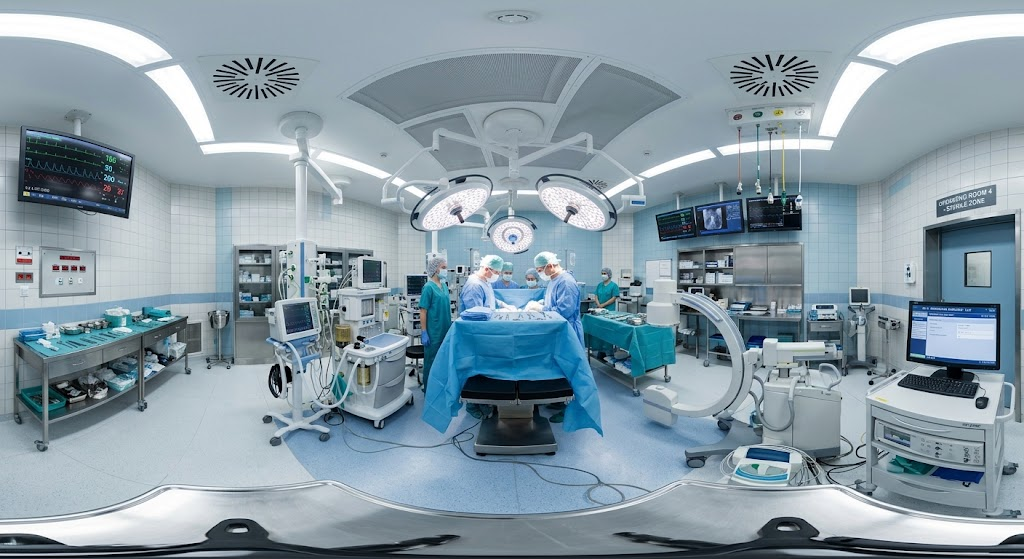
You may use AI to complete your research and ask AI to help
-
Brainstorm the dialogue between avatars / characters in your scene to convey the information.
-
Generate graphics/images to include in a 3D Model or 360-image scene
-
You will need to declare in your post about what you have done with AI and how
Collaboration with UniCampus
For this project you will use UniCampus, an online collaboration tool managed by UPT, to share your group’s progress with each other and with your instructors. To access this account please check the email message you will receive with your login information (including your Spam and Junk). The course is located here - https://unicampus.ro/cursuri/course/view.php?id=338
You will receive your individual UniCampus account via email!
Use the BLOG feature of UniCampus to share your group’s multimedia and video files, findings, progress, the AI use and reflections.
Post a summary of your conversations, text messages, on UniCampus each week as you work on the project, in the Blog of your group.
Complete your scenes on https://www.delightex.com/edu and you should join with the class code 7CBRW instructions below
-
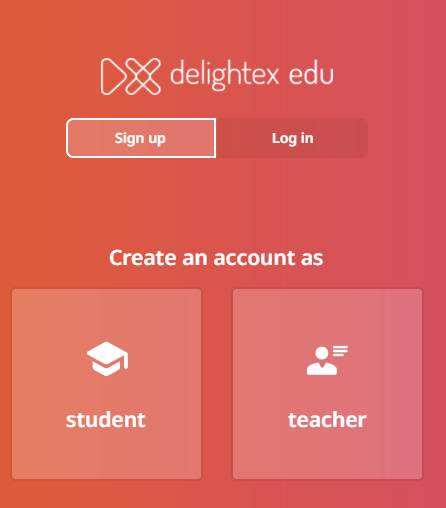
Create your account using your university email and your real name as STUDENT and the class code 7CBRW here https://www.delightex.com/edu https://edu.delightex.com/Auth/Signup
Project Schedule
|
By end of day: |
What You Should Have Completed |
|
Oct 14 |
Project Kickoff: Select your industry topic, set up your individual Delightex/UniCampus accounts, and complete your partner profile. |
|
Oct 21 |
Team Planning & Design: Meet with your UPT/Bentley partners, establish your communication method, outline your 3 scenes (Bentley Present-Day, UPT Present-Day, Collaborative 2035), and submit Blog Post 1. |
|
Oct 28 |
Scene Building & Integration: Build your 360° present-day scenes in Delightex, connect them with jump/teleport buttons, and start mapping out the collaborative 2035 scene. Start Learning Delightex (attend a training in the CIS Sandbox or watch online videos) |
|
Nov 4 |
Collaborative Scene & Final Touches: Finish the collaborative 2035 scene using CoBlocks/animation,. Add the “teleport” button between scenes. Check in with partners,Blog Post 2. |
|
Nov 11 |
Review & Final Polish: Finalize all 3 scenes, ensure smooth navigation between the scenes, and record a quick partner check-in video tour. Meet with your international partners on Zoom to critique each other’s work. Record the conversation. |
|
Dec 3 |
Projects Due: All deliverables uploaded to UniCampus, final project links posted, and Final Reflection Blog Posts due. |
Blog Posts
1 Initial Progress and Planning (one per school, about 100 words)
-
Topic, why you chose it
-
Brief overview describing each of the 3 scenes you plan to create
-
Progress so far
-
What you’ll be working on for the next two weeks
2 Mid-Project Progress (one per school, about 100 words)
-
What’s new since Blog #1
-
What’s going well, any challenges?
-
What did you learn about technology in your chosen industry?
-
What you’ll be working on next
3 Reflection Blog Post (one per person, about 200 words) -
Write a concise reflection (about 200 words) addressing a few of these key areas:
-
Your Focus & Experience: What industry did your team choose, and what surprised you most about how AI is used there today versus in the year 2035?
-
Global Teamwork: How did you and your international (Bentley/UPT) partners divide responsibilities and handle cross-cultural collaboration?
-
AI & VR Learnings: How did you use AI tools in your workflow, and what did you learn about building virtual reality experiences in Delightex?
-
Proudest Takeaway: What are you most proud of in your final 3-scene project, and how has this changed your perspective on global technology?
Virtual Reality Scene Requirements
You and your international partners will build your VR project together in the same Delightex project (formerly called CoSpaces).
👉 If you work in separate projects, the “jump” buttons between your scenes won’t work — so make sure you’re in the same one!
Your group will design one shared VR story about your topic — showing the role of technology in your industry. Your story should include:
-
3 scenes total: Scene 1 by Bentley (Present Day 2026), Scene 2 by UPT (Present Day 2026), and Scene 3 built collaboratively (Futuristic 2035)
-
“Jump” buttons that let users move between the scenes.
Each scene should include:
-
Avatars and dialogue that share at least four facts about your topic.
-
Present-day scenes using an AI-generated 360° photo background to display the current state of AI in 2026.
-
One collaborative futuristic 3D environment showcasing the transformation of the industry in 2035.
Design Tips
-
Use a template or design your own 3D world — just make it fit your topic and location.
-
You can tell your story in two ways:
-
Sequential: scene 1 → scene 2 → scene 3
-
Unstructured: a “home” or “lobby” scene with buttons linking to the others.
-
Be creative! Mix visuals, sounds, and animation to bring your story to life.
Video Tutorials
-
shows how to add a jump button.
-
Watch
for info on how to set up your scenes.
Videos
Critique Video. Record a Zoom meeting with your partners as you present and critique each other’s scenes. Discuss similarities and differences, record the conversation on Zoom.Create a 3 to 5 minute video in which all team members demo, discuss and critique the VR scenes created by your partners.
Video Tour
Create a short (1 minute) video tour of your scenes where you screen-share and do a walk-through of the 3 scenes. Upload the mp4 or avi file to the FILES section on Unicampus. Or store the video on your OneDrive and post a link on unicampus. Be sure to set the permissions so anyone with the link can view.
Using Delightex
Use Delightex to create your VR experience. You can animate your VR world without too much difficulty using CoBlocks, a block-based visual programming environment. Since the UPT students have programming experience, they are required to do this, and can help the Bentley students to animate their VR worlds. Bentley students can ask CIS Sandbox tutors for help.
Each student must go to 7CBRW ( create an account;. Enter the class code 7CBRW and then use your real first and last name and school email address for the username information. Enter your birthday!
-
Go to edu.delightex.com
-
Sign up using your real name and your university student account
-
Select Student
-
Class code: 7CBRW
-
Name: Your Name
-
Username: Your university Email
-
Password: you choose
.
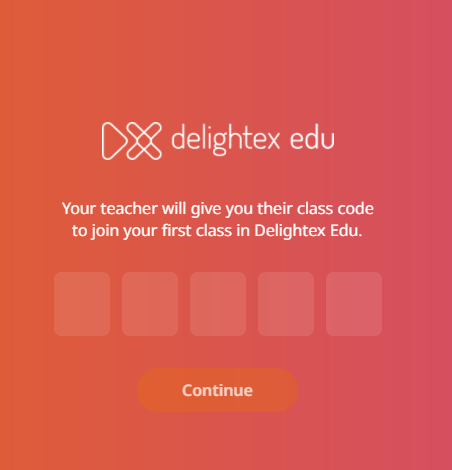
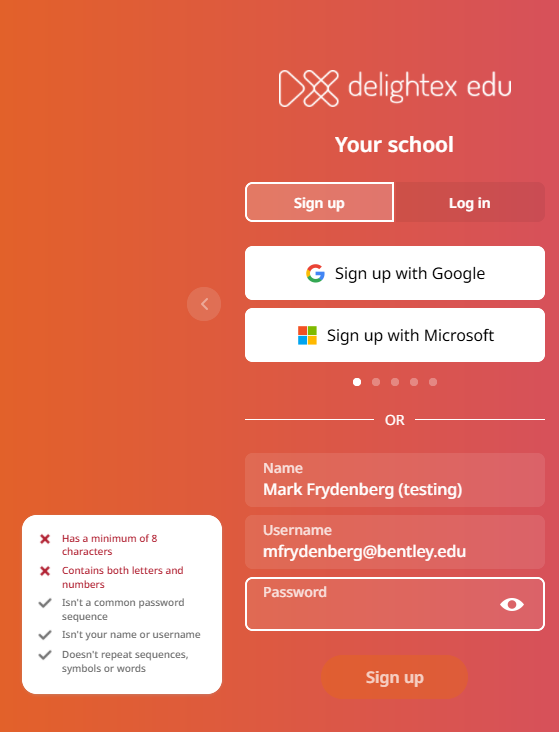
Finally, accept the terms and conditions.
You will be assigned to the TT26 Group number with your Bentley and UPT team members. Then you should be ready to go!